Open items list
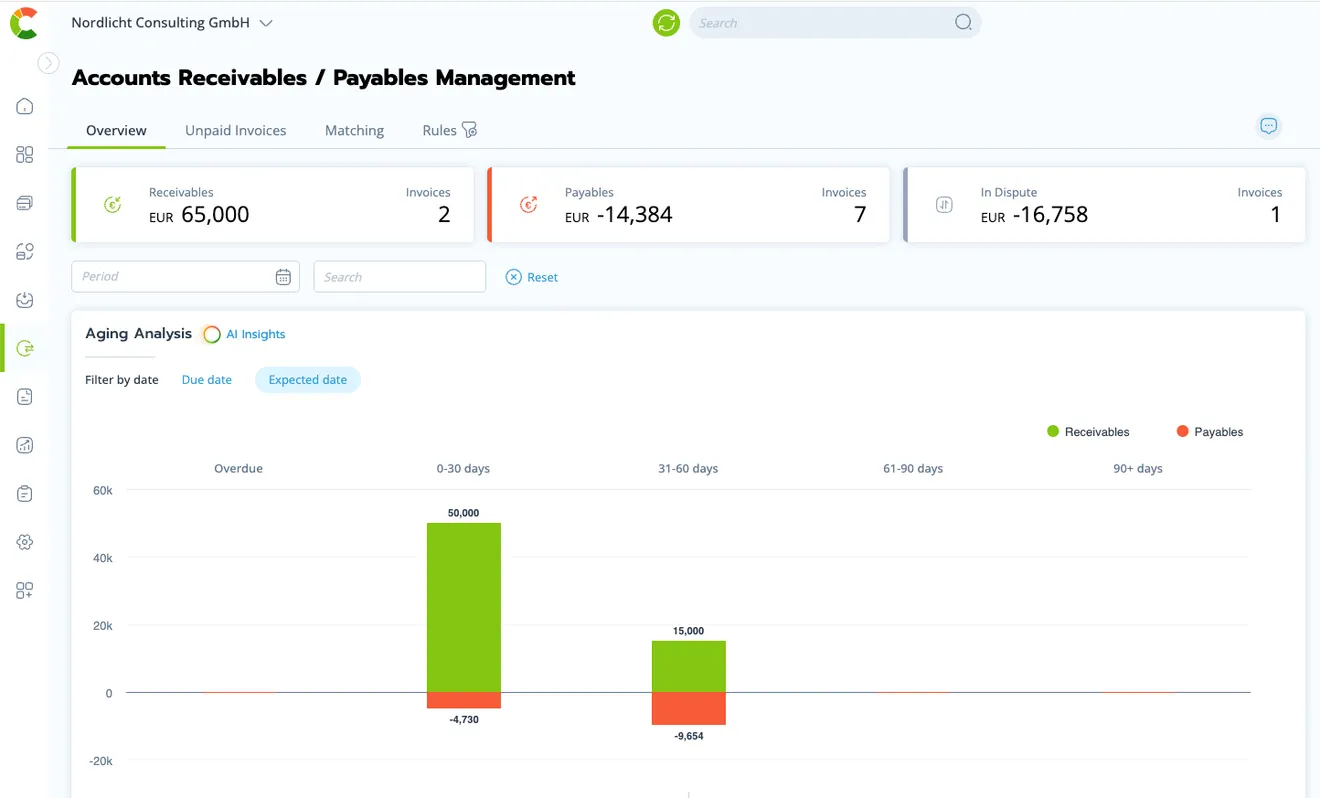


All open items – clearly laid out in one place
Your open items list goes where you need it: via an integration with your accounting or ERP system, via CSV import – from DATEV, for example – or as a single entry by hand. With integrations, new and paid items keep updating automatically.
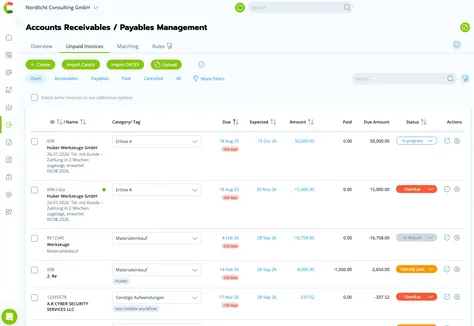
Monitor open items & read the OPOS list correctly
All open payments sit in one list, with due date, status and filters. When an invoice becomes overdue, its status switches to overdue automatically – and a warning appears on HOME and in the HEALTH dashboard. So you chase open invoices in time instead of overlooking them.
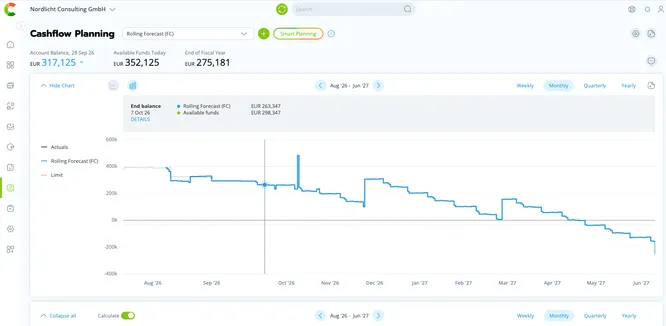
The open items list as the basis of the cash flow plan
Already have a cash flow plan? Every open item sits in it with its due date – you see whether your targets hold.
Don't have one yet? COMMITLY automatically builds a first draft from your open receivables and payables and your actuals.
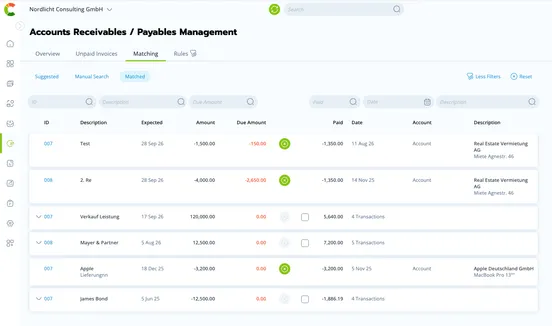
Clear open items – automatically with your payments
COMMITLY matches open items against the transactions on your accounts – including partial and collective payments. Detected matches are shown to you on HOME. The list stays current, and your forecast works with what is really still to come.
Why the OPOS list decides your liquidity
You see what is really coming.
The OPOS list shows every open receivable and payable with its due date. COMMITLY takes it from DATEV, Lexware Office, sevdesk or your ERP and builds it into the forecast – instead of planning with averages.
You spot shortfalls before they happen.
If a large customer pays later, the due date moves in the plan too. The shortfall becomes visible while there is still time for a reminder, a credit line or a postponed payment.
You decide when you pay.
With an overview of all open items you choose deliberately which payable is settled when – for a discount, against interest costs, or to gain a week of breathing room.
COMMITLY doesn't keep books. Open items accounting stays in DATEV, Lexware Office or sevdesk. COMMITLY answers the question that comes after: what do these open items mean for my liquidity over the next few weeks?
Keep open items current – with Claude or ChatGPT
With AI Connect, COMMITLY's MCP server, your AI assistant works directly with your open items list: it creates an open item from a PDF invoice or moves the expected payment date when a customer wants to pay later. Changes land as drafts and wait for your approval.
AI Connect is an add-on in Business and included from Professional.
Features for your open items list
- Due date overviewAll open items sorted and filtered by due date – you see at once what falls due this week and next.
- Expected payment dateCOMMITLY automatically works with the day payment actually arrives – independent of the due date on the invoice.
- Status & warningsOpen, paid, disputed, overdue – for many items at once, too. Overdue invoices show up on HOME and in the HEALTH dashboard.
- Automatic matchingOpen items are matched against your payments – including partial and collective payments.
- Import from existing systemsImport via CSV or ongoing sync from your accounting or ERP system.
- API & MCP serverSend open items via the COMMITLY API or query them with your AI assistant via the MCP server – both from Business.
Where your open items come from
- DATEV (CSV)
- Lexware Office
- sevdesk
- BuchhaltungsButler
- FastBill
- Billomat
- easybill
- GetMyInvoices
- weclapp
- Zoho Books
- MOCO
- Candis
- Moss
- Agenda
- COMMITLY Bills
- API & MCP

Ready for your cash flow platform?
Questions about
the open items list
The OPOS list – also called open items list or OP list – holds every invoice that has not been paid yet: amounts your customers owe you and amounts you owe your suppliers. An item stays open until the payment has been received or made. More on the term in the article Open items – meaning and why they matter for liquidity.